多语言微服务架构:Node.js与Python协作
概述
在微服务架构中,根据场景选择最适合的编程语言是最佳实践。本文将介绍如何在微服务平台中实现Node.js与Python的协作,发挥各自技术优势。
技术选型策略
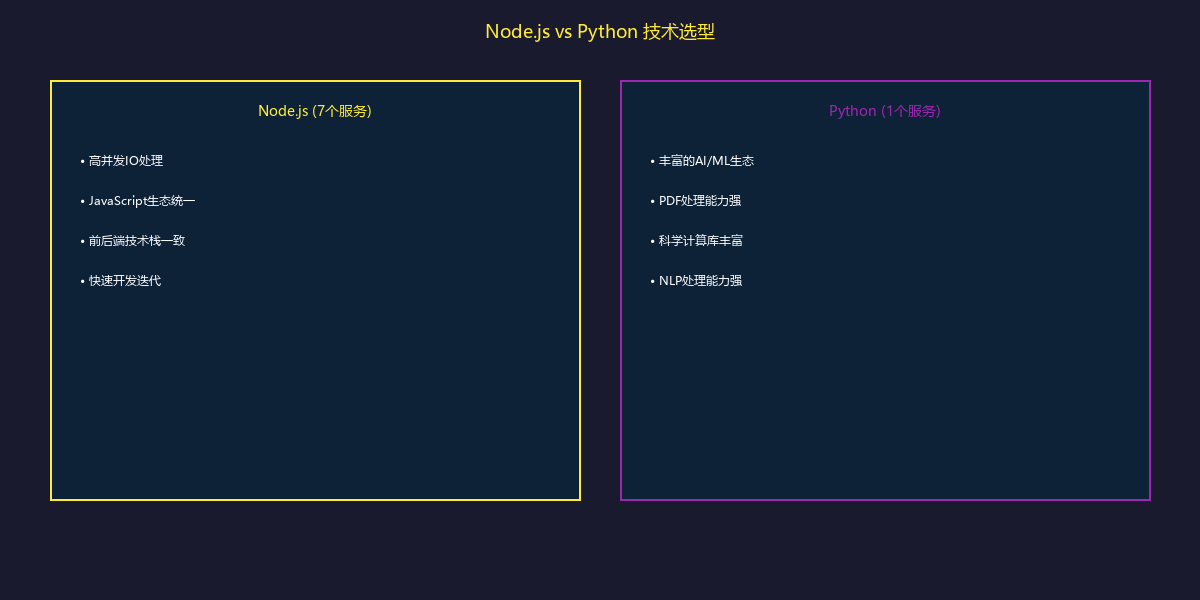
为什么混合使用
服务划分
Node.js服务(7个)
| 服务 | 功能 | 选择Node.js的原因 |
|---|---|---|
| llm.api | 大模型服务 | 高并发SSE流式响应 |
| ucenter.api | 用户中心 | RESTful API标准实践 |
| doc.api | 文件服务 | 流式上传下载处理 |
| resource.api | 资源管理 | gRPC高性能通信 |
| rag.api | 知识库服务 | MongoDB集成便利 |
| statistic.api | 统计分析 | 事件驱动架构 |
| pptonline.api | PPT服务 | 与前端技术栈统一 |
Python服务(1个)
| 服务 | 功能 | 选择Python的原因 |
|---|---|---|
| transform.api | 文档转换 | PDF/Excel处理生态丰富 |
transform.api详解
Python技术栈
| 技术 | 版本 | 用途 |
|---|---|---|
| Python | 3.12 | 运行环境 |
| FastAPI | 0.115.12 | Web框架 |
| Uvicorn | 0.34.1 | ASGI服务器 |
| pypdfium2 | 4.30.1 | PDF处理 |
| spacy | 3.8.7 | NLP处理 |
| pandas | 2.3.0 | 数据处理 |
| openpyxl | 3.1.5 | Excel处理 |
| xinference-client | 1.14.0 | OCR模型 |
项目结构
transform.api/
├── main.py                     # FastAPI应用入口
├── pyproject.toml              # Poetry配置
├── uv.lock                     # 依赖锁定
├── Dockerfile                  # 容器镜像
├── services/
│   ├── __init__.py
│   ├── pdf.py                  # PDF处理服务
│   ├── ocr.py                  # OCR识别服务
│   ├── excel.py                # Excel处理服务
│   ├── word.py                 # Word处理服务
│   ├── chunker.py              # 文本分段服务
│   └── nlp.py                  # NLP分析服务
├── routers/
│   ├── __init__.py
│   ├── pdf.py                  # PDF路由
│   ├── document.py             # 通用文档路由
│   └── health.py               # 健康检查
├── models/
│   ├── __init__.py
│   ├── requests.py             # 请求模型
│   └── responses.py            # 响应模型
└── utils/
    ├── __init__.py
    └── file_storage.py         # 文件存储工具
FastAPI应用配置
# main.py
from contextlib import asynccontextmanager
from fastapi import FastAPI
from fastapi.middleware.cors import CORSMiddleware

from routers import pdf, document, health
from services.pdf import PDFService
from services.ocr import OCRService

# 生命周期管理
@asynccontextmanager
async def lifespan(app: FastAPI):
    # 启动时初始化
    app.state.pdf_service = PDFService()
    app.state.ocr_service = OCRService()
    await app.state.pdf_service.initialize()
    await app.state.ocr_service.initialize()

    print("Transform API started")
    yield

    # 关闭时清理
    await app.state.pdf_service.cleanup()
    await app.state.ocr_service.cleanup()
    print("Transform API stopped")

app = FastAPI(
    title="Transform API",
    description="Document transformation service",
    version="1.0.0",
    lifespan=lifespan
)

# CORS配置
app.add_middleware(
    CORSMiddleware,
    allow_origins=["*"],
    allow_credentials=True,
    allow_methods=["*"],
    allow_headers=["*"],
)

# 路由注册
app.include_router(health.router, prefix="/health")
app.include_router(pdf.router, prefix="/pdf")
app.include_router(document.router, prefix="/doc")

@app.get("/")
async def root():
    return {"message": "Transform API", "version": "1.0.0"}
PDF处理服务
PDF文本提取
# services/pdf.py
import pypdfium2 as pdfium
from typing import List, Dict, Optional
import asyncio

class PDFService:
    def __init__(self):
        self.ocr_service = None

    async def initialize(self):
        from services.ocr import OCRService
        self.ocr_service = OCRService()
        await self.ocr_service.initialize()

    async def extract_text(
        self,
        file_path: str,
        ocr_enabled: bool = True,
        language: str = 'zh'
    ) -> Dict:
        """提取PDF文本内容"""

        # 在线程池中执行CPU密集型操作
        loop = asyncio.get_event_loop()
        return await loop.run_in_executor(
            None,
            self._extract_text_sync,
            file_path,
            ocr_enabled,
            language
        )

    def _extract_text_sync(
        self,
        file_path: str,
        ocr_enabled: bool,
        language: str
    ) -> Dict:
        """同步执行PDF提取(在线程池中)"""

        pdf = pdfium.PdfDocument(file_path)

        pages = []
        full_text = []

        for page_num in range(len(pdf)):
            page = pdf[page_num]

            # 提取页面文本
            text_page = page.get_textpage()
            text = text_page.get_text_range()

            # 如果文本为空且启用OCR,进行图像识别
            if not text.strip() and ocr_enabled:
                text = self._ocr_page(page, language)

            pages.append({
                'pageNum': page_num + 1,
                'text': text,
                'charCount': len(text),
                'hasText': bool(text.strip())
            })

            full_text.append(text)

        return {
            'totalPages': len(pdf),
            'pages': pages,
            'fullText': '\n\n'.join(full_text),
            'charCount': sum(len(t) for t in full_text)
        }

    def _ocr_page(self, page, language: str) -> str:
        """对页面进行OCR识别"""
        # 渲染页面为图片
        bitmap = page.render(
            scale=2.0,
            rotation=0,
        )

        # 保存临时图片
        import tempfile
        with tempfile.NamedTemporaryFile(suffix='.png', delete=False) as f:
            bitmap.save_as_png(f.name)

            # 调用OCR服务
            text = asyncio.run(self.ocr_service.recognize(f.name, language))

            import os
            os.unlink(f.name)

            return text

    async def extract_metadata(self, file_path: str) -> Dict:
        """提取PDF元数据"""
        loop = asyncio.get_event_loop()
        return await loop.run_in_executor(
            None, self._extract_metadata_sync, file_path
        )

    def _extract_metadata_sync(self, file_path: str) -> Dict:
        pdf = pdfium.PdfDocument(file_path)

        metadata = {
            'pageCount': len(pdf),
            'version': pdf.get_version(),
            'metadata': {},
            'isTagged': pdf.is_tagged(),
        }

        # 提取文档元数据
        doc_metadata = pdf.get_metadata_dict()
        if doc_metadata:
            metadata['metadata'] = {
                'title': doc_metadata.get('Title', ''),
                'author': doc_metadata.get('Author', ''),
                'subject': doc_metadata.get('Subject', ''),
                'keywords': doc_metadata.get('Keywords', ''),
                'creator': doc_metadata.get('Creator', ''),
                'producer': doc_metadata.get('Producer', ''),
                'creationDate': doc_metadata.get('CreationDate', ''),
                'modDate': doc_metadata.get('ModDate', ''),
            }

        return metadata
OCR服务
# services/ocr.py
from xinference_client import Client as XinferenceClient
import openai
import base64

class OCRService:
    def __init__(self):
        self.xinference = None
        self.openai = None

    async def initialize(self):
        # 初始化Xinference客户端
        self.xinference = XinferenceClient(
            base_url="http://xinference-server:9997"
        )

        # 初始化OpenAI客户端(用于多模态识别)
        import os
        self.openai = openai.AsyncOpenAI(
            api_key=os.getenv("OPENAI_API_KEY")
        )

    async def recognize(self, image_path: str, language: str = 'zh') -> str:
        """识别图片中的文字"""

        try:
            # 优先使用Xinference OCR模型
            model = self.xinference.get_model("qwen2-vl-ocr")
            response = model.chat({
                'messages': [{
                    'role': 'user',
                    'content': [
                        {'type': 'image', 'image': image_path},
                        {'type': 'text', 'text': '提取图片中的所有文字'}
                    ]
                }]
            })

            return response['choices'][0]['message']['content']

        except Exception as e:
            print(f"Xinference OCR failed: {e}, fallback to OpenAI")
            return await self._recognize_with_openai(image_path, language)

    async def _recognize_with_openai(self, image_path: str, language: str) -> str:
        """使用OpenAI多模态模型识别"""

        with open(image_path, 'rb') as f:
            image_base64 = base64.b64encode(f.read()).decode()

        response = await self.openai.chat.completions.create(
            model="gpt-4-vision-preview",
            messages=[{
                "role": "user",
                "content": [
                    {
                        "type": "text",
                        "text": f"Extract all text from this image. Language: {language}"
                    },
                    {
                        "type": "image_url",
                        "image_url": {
                            "url": f"data:image/png;base64,{image_base64}"
                        }
                    }
                ]
            }]
        )

        return response.choices[0].message.content
文本处理服务
智能分段
# services/chunker.py
import spacy
from typing import List, Dict, Optional
import re

class TextChunker:
    def __init__(self):
        self.nlp_zh = None
        self.nlp_en = None

    async def initialize(self):
        # 加载多语言NLP模型
        self.nlp_zh = spacy.load("zh_core_web_sm")
        self.nlp_en = spacy.load("en_core_web_sm")

    def chunk_text(
        self,
        text: str,
        chunk_size: int = 500,
        chunk_overlap: int = 50,
        language: str = 'zh'
    ) -> List[Dict]:
        """智能文本分段"""

        # 选择语言模型
        nlp = self.nlp_zh if language == 'zh' else self.nlp_en

        # 预处理文本
        text = self._preprocess(text)

        # 语义分段
        doc = nlp(text)

        chunks = []
        current_chunk = []
        current_size = 0

        for sent in doc.sents:
            sent_text = sent.text.strip()
            sent_length = len(sent_text)

            # 检查是否超过限制
            if current_size + sent_length > chunk_size and current_chunk:
                # 保存当前块
                chunk_text = ' '.join(current_chunk)
                chunks.append({
                    'text': chunk_text,
                    'tokenCount': len(chunk_text),
                    'sentenceCount': len(current_chunk),
                    'startChar': sum(len(s) for s in chunks[:-1]) if chunks else 0,
                    'endChar': sum(len(s) for s in chunks[:-1]) + len(chunk_text) if chunks else len(chunk_text),
                })

                # 保留重叠部分
                overlap_sentences = self._get_overlap_sentences(
                    current_chunk, chunk_overlap
                )
                current_chunk = overlap_sentences + [sent_text]
                current_size = sum(len(s) for s in current_chunk)
            else:
                current_chunk.append(sent_text)
                current_size += sent_length

        # 处理最后一个块
        if current_chunk:
            chunk_text = ' '.join(current_chunk)
            chunks.append({
                'text': chunk_text,
                'tokenCount': len(chunk_text),
                'sentenceCount': len(current_chunk),
                'startChar': sum(c['tokenCount'] for c in chunks),
                'endChar': sum(c['tokenCount'] for c in chunks) + len(chunk_text),
            })

        return chunks

    def _preprocess(self, text: str) -> str:
        """文本预处理"""
        # 去除多余空白
        text = re.sub(r'\s+', ' ', text)
        # 去除页眉页脚标记
        text = re.sub(r'\n\s*\d+\s*\n', '\n', text)
        return text.strip()

    def _get_overlap_sentences(self, sentences: List[str], overlap_size: int) -> List[str]:
        """获取重叠的句子"""
        overlap = []
        total_size = 0

        for sent in reversed(sentences):
            if total_size + len(sent) <= overlap_size:
                overlap.insert(0, sent)
                total_size += len(sent)
            else:
                break

        return overlap
NLP分析
# services/nlp.py
import spacy
from typing import List, Dict
from collections import Counter

class NLPService:
    def __init__(self):
        self.nlp_zh = None
        self.nlp_en = None

    async def initialize(self):
        self.nlp_zh = spacy.load("zh_core_web_sm")
        self.nlp_en = spacy.load("en_core_web_sm")

    def analyze(self, text: str, language: str = 'zh') -> Dict:
        """文本分析"""

        nlp = self.nlp_zh if language == 'zh' else self.nlp_en
        doc = nlp(text)

        # 命名实体识别
        entities = [
            {
                'text': ent.text,
                'label': ent.label_,
                'start': ent.start_char,
                'end': ent.end_char,
            }
            for ent in doc.ents
        ]

        # 关键词提取(基于词频)
        tokens = [
            token.text.lower()
            for token in doc
            if not token.is_stop and not token.is_punct and len(token.text) > 1
        ]
        keywords = [
            {'word': word, 'count': count}
            for word, count in Counter(tokens).most_common(10)
        ]

        # 句子情感分析(简单基于关键词)
        sentiment = self._analyze_sentiment(doc)

        return {
            'entities': entities,
            'keywords': keywords,
            'sentiment': sentiment,
            'stats': {
                'wordCount': len(doc),
                'sentenceCount': len(list(doc.sents)),
                'entityCount': len(entities),
            }
        }

    def _analyze_sentiment(self, doc) -> Dict:
        """简单情感分析"""
        # 基于正面/负面词库
        positive_words = {'好', '优秀', '成功', '喜欢', '推荐'}
        negative_words = {'差', '失败', '讨厌', '糟糕', '问题'}

        text = doc.text
        pos_count = sum(1 for word in positive_words if word in text)
        neg_count = sum(1 for word in negative_words if word in text)

        if pos_count > neg_count:
            return {'label': 'positive', 'score': min(pos_count / (pos_count + neg_count + 1), 1.0)}
        elif neg_count > pos_count:
            return {'label': 'negative', 'score': min(neg_count / (pos_count + neg_count + 1), 1.0)}
        else:
            return {'label': 'neutral', 'score': 0.5}
API路由
PDF处理路由
# routers/pdf.py
from fastapi import APIRouter, File, UploadFile, HTTPException
from typing import Optional
import tempfile
import os

from services.pdf import PDFService
from models.requests import PDFExtractRequest
from models.responses import PDFExtractResponse

router = APIRouter()

@router.post("/extract", response_model=PDFExtractResponse)
async def extract_pdf(
    file: UploadFile = File(...),
    ocr_enabled: bool = True,
    language: str = 'zh',
    extract_metadata: bool = True
):
    """提取PDF内容"""

    # 验证文件类型
    if not file.filename.endswith('.pdf'):
        raise HTTPException(status_code=400, detail="Only PDF files are allowed")

    # 保存上传文件
    with tempfile.NamedTemporaryFile(delete=False, suffix='.pdf') as tmp:
        content = await file.read()
        tmp.write(content)
        tmp_path = tmp.name

    try:
        from main import app
        pdf_service: PDFService = app.state.pdf_service

        # 提取文本
        result = await pdf_service.extract_text(
            tmp_path,
            ocr_enabled=ocr_enabled,
            language=language
        )

        # 提取元数据
        metadata = None
        if extract_metadata:
            metadata = await pdf_service.extract_metadata(tmp_path)

        return PDFExtractResponse(
            success=True,
            data={
                'filename': file.filename,
                'pageCount': result['totalPages'],
                'pages': result['pages'],
                'fullText': result['fullText'],
                'charCount': result['charCount'],
                'metadata': metadata
            }
        )

    except Exception as e:
        raise HTTPException(status_code=500, detail=str(e))

    finally:
        os.unlink(tmp_path)

@router.post("/chunk")
async def chunk_pdf(
    file: UploadFile = File(...),
    chunk_size: int = 500,
    chunk_overlap: int = 50,
    language: str = 'zh'
):
    """PDF分段"""

    from services.chunker import TextChunker

    # 提取文本
    with tempfile.NamedTemporaryFile(delete=False, suffix='.pdf') as tmp:
        content = await file.read()
        tmp.write(content)
        tmp_path = tmp.name

    try:
        from main import app
        pdf_service = app.state.pdf_service

        result = await pdf_service.extract_text(tmp_path, language=language)

        # 分段
        chunker = TextChunker()
        await chunker.initialize()

        chunks = chunker.chunk_text(
            result['fullText'],
            chunk_size=chunk_size,
            chunk_overlap=chunk_overlap,
            language=language
        )

        return {
            'success': True,
            'data': {
                'chunkCount': len(chunks),
                'chunks': chunks
            }
        }

    finally:
        os.unlink(tmp_path)
Node.js调用Python服务
gRPC客户端
// micro-platform/llm.api/grpc/clients/extractor.js
import grpc from '@grpc/grpc-js'
import protoLoader from '@grpc/proto-loader'

const PROTO_PATH = './grpc/proto/extractor.proto'

const packageDefinition = protoLoader.loadSync(PROTO_PATH, {
  keepCase: true,
  longs: String,
  enums: String,
  defaults: true,
  oneofs: true,
})

const extractorProto = grpc.loadPackageDefinition(packageDefinition).extractor

export class ExtractorClient {
  constructor(serviceUrl) {
    this.client = new extractorProto.ExtractorService(
      serviceUrl,
      grpc.credentials.createInsecure()
    )
  }

  // 提取PDF文本
  async extractPDF(filePath, options = {}) {
    return new Promise((resolve, reject) => {
      this.client.extractPDF({
        filePath,
        ocrEnabled: options.ocrEnabled ?? true,
        language: options.language ?? 'zh',
      }, (error, response) => {
        if (error) reject(error)
        else resolve(response)
      })
    })
  }

  // 分段文本
  async chunkText(text, options = {}) {
    return new Promise((resolve, reject) => {
      this.client.chunkText({
        text,
        chunkSize: options.chunkSize ?? 500,
        chunkOverlap: options.chunkOverlap ?? 50,
        language: options.language ?? 'zh',
      }, (error, response) => {
        if (error) reject(error)
        else resolve(response)
      })
    })
  }
}
HTTP调用示例
// Node.js服务调用transform.api
class TransformService {
  constructor() {
    this.baseUrl = process.env.TRANSFORM_API_URL || 'http://transform.api:8000'
  }

  async extractPDF(fileBuffer, options = {}) {
    const formData = new FormData()
    formData.append('file', new Blob([fileBuffer]), 'document.pdf')
    formData.append('ocr_enabled', String(options.ocrEnabled ?? true))
    formData.append('language', options.language ?? 'zh')

    const response = await fetch(`${this.baseUrl}/pdf/extract`, {
      method: 'POST',
      body: formData,
    })

    if (!response.ok) {
      throw new Error(`Transform API error: ${response.status}`)
    }

    return await response.json()
  }

  async chunkText(text, options = {}) {
    const response = await fetch(`${this.baseUrl}/doc/chunk`, {
      method: 'POST',
      headers: { 'Content-Type': 'application/json' },
      body: JSON.stringify({
        text,
        chunk_size: options.chunkSize ?? 500,
        chunk_overlap: options.chunkOverlap ?? 50,
        language: options.language ?? 'zh',
      }),
    })

    return await response.json()
  }
}
Docker配置
Python服务Dockerfile
# transform.api/Dockerfile
FROM python:3.12-slim

# 安装系统依赖
RUN apt-get update && apt-get install -y \
    gcc \
    libglib2.0-0 \
    libsm6 \
    libxext6 \
    libxrender-dev \
    libgomp1 \
    wget \
    && rm -rf /var/lib/apt/lists/*

# 安装uv
RUN pip install uv

WORKDIR /app

# 复制依赖文件
COPY pyproject.toml uv.lock ./

# 安装Python依赖
RUN uv sync --no-dev

# 下载Spacy模型
RUN uv run python -m spacy download zh_core_web_sm
RUN uv run python -m spacy download en_core_web_sm

# 复制应用代码
COPY . .

# 暴露端口
EXPOSE 8000

# 健康检查
HEALTHCHECK --interval=30s --timeout=10s --start-period=40s --retries=3 \
    CMD curl -f http://localhost:8000/health || exit 1

# 启动命令
CMD ["uv", "run", "uvicorn", "main:app", "--host", "0.0.0.0", "--port", "8000", "--workers", "4"]
总结
多语言微服务协作的关键点:
- 合理分工:Node.js处理API和IO,Python处理计算密集型任务
- 服务通信:gRPC用于高性能调用,HTTP用于简单场景
- 异步处理:Python使用asyncio,Node.js使用async/await
- 线程池:Python CPU密集型任务放入线程池
- 模型共享:NLP模型在服务启动时预加载
- 错误处理:完善的降级策略和错误恢复
下一篇将介绍gRPC服务通信的设计与实践。