AI-Native架构:大模型服务设计与实现
概述
在AI时代,将大语言模型能力深度集成到应用平台已成为趋势。本文将介绍如何在微服务平台中设计和实现AI-Native的大模型服务(LLM Service),涵盖多频道管理、流式响应、Agent执行等核心能力。
什么是AI-Native架构
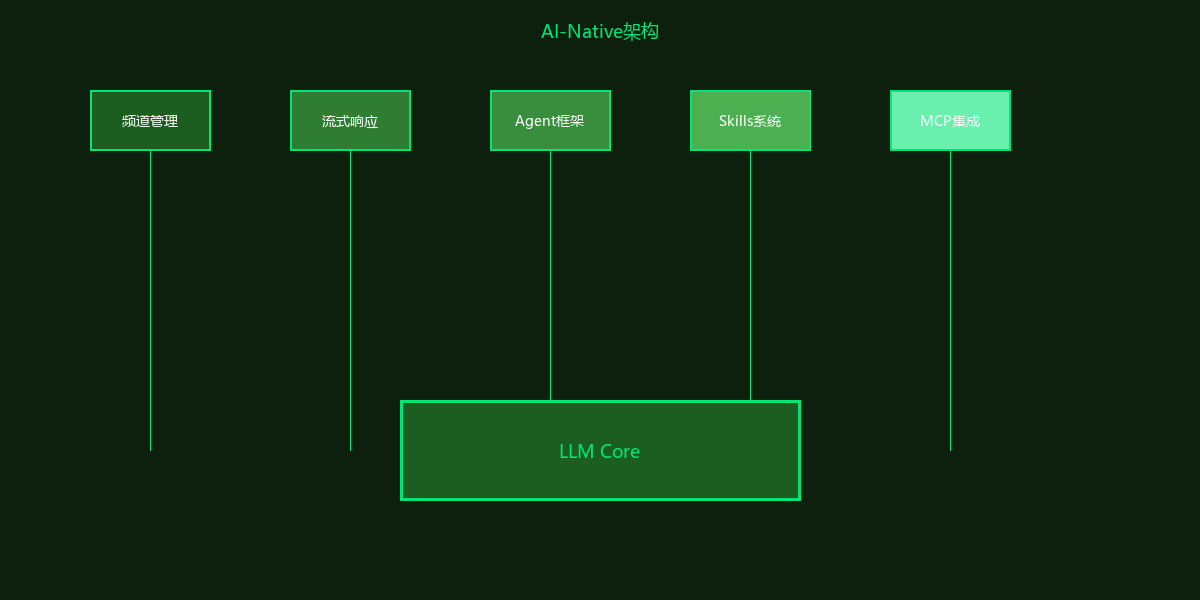
AI-Native架构是指从设计之初就围绕AI能力构建的系统架构,而非后期添加AI功能。关键特征包括:
- 频道化架构:支持多租户、多场景的LLM配置隔离
- 流式响应:实时输出AI生成的内容
- Agent框架:支持多步骤任务执行
- 技能系统(SKills):可扩展的领域专家能力
- MCP集成:标准化工具调用协议
LLM服务架构设计
服务结构
llm.api/
├── app.js                     # Fastify应用入口
├── routes/
│   ├── chat/root.js          # 聊天API路由
│   ├── agent/root.js         # Agent任务路由
│   └── channel/root.js       # 频道管理路由
├── services/
│   ├── agent/                # Agent服务
│   ├── core/                 # 核心服务
│   └── openai/               # OpenAI集成
├── skill/                    # Skills系统
│   ├── skillManager.js       # Skills管理器
│   ├── skillChat.js          # 聊天集成
│   ├── skillParser.js        # SKILL.md解析器
│   └── skills/               # 内置Skills
│       ├── code-reviewer/    # 代码审查专家
│       ├── document-extractor/ # 文档提取专家
│       └── ...
├── mcp/                      # MCP工具管理
│   ├── clientManager.js      # MCP客户端管理
│   ├── toolManager.js        # 工具调用管理
│   └── sseClient.js          # SSE客户端
└── grpc/                     # gRPC服务
    ├── clients/              # gRPC客户端
    └── servers/              # gRPC服务端
核心数据模型
// 频道(Channel)模型 - 隔离不同场景的LLM配置
{
  channelCode: "default",           // 频道标识
  channelType: "chat",              // 频道类型:chat/agent
  model: "gpt-4",                   // 使用的模型
  temperature: 0.7,                 // 温度参数
  maxTokens: 4096,                  // 最大Token数
  systemPrompt: "You are a helpful assistant.",
  skills: ["code-reviewer"],        // 启用的Skills
  mcpServers: ["file-system"],      // MCP服务配置
  streamMode: true                  // 是否流式输出
}

// 消息(Message)模型
{
  messageId: "msg-uuid",
  channelCode: "default",
  role: "user",                     // user/assistant/system
  content: "Hello!",
  metadata: {
    tokens: 10,
    model: "gpt-4",
    finishReason: "stop"
  }
}
多频道会话管理
频道管理实现
// services/core/channelService.js
class ChannelService {
  constructor(fastify) {
    this.fastify = fastify
    this.channels = new Map() // 内存缓存
  }

  // 创建或获取频道
  async getOrCreateChannel(channelCode, userId) {
    const cacheKey = `${userId}:${channelCode}`

    if (this.channels.has(cacheKey)) {
      return this.channels.get(cacheKey)
    }

    // 从数据库加载频道配置
    const channel = await this.fastify.mongo.db
      .collection('channels')
      .findOne({ channelCode, userId })

    if (!channel) {
      // 使用默认配置创建新频道
      return this.createDefaultChannel(userId, channelCode)
    }

    this.channels.set(cacheKey, channel)
    return channel
  }

  // 获取频道配置(包含模型参数)
  async getChannelConfig(channelCode) {
    const channel = await this.getChannel(channelCode)
    return {
      model: channel.model,
      temperature: channel.temperature,
      maxTokens: channel.maxTokens,
      systemPrompt: channel.systemPrompt
    }
  }
}
会话上下文管理
// services/core/conversationService.js
class ConversationService {
  // 获取会话历史
  async getConversationHistory(channelCode, limit = 20) {
    const messages = await this.fastify.mongo.db
      .collection('messages')
      .find({ channelCode })
      .sort({ createdAt: -1 })
      .limit(limit)
      .toArray()

    return messages.reverse().map(msg => ({
      role: msg.role,
      content: msg.content
    }))
  }

  // 保存消息
  async saveMessage(channelCode, role, content, metadata = {}) {
    const message = {
      channelCode,
      role,
      content,
      metadata,
      createdAt: new Date()
    }

    await this.fastify.mongo.db
      .collection('messages')
      .insertOne(message)

    return message
  }
}
流式响应(SSE)实现
SSE服务端实现
// routes/chat/root.js
export default async function chatRoutes(fastify, opts) {

  // 流式聊天接口
  fastify.post('/stream', async (request, reply) => {
    const { channelCode, message } = request.body

    // 设置SSE响应头
    reply.raw.writeHead(200, {
      'Content-Type': 'text/event-stream',
      'Cache-Control': 'no-cache',
      'Connection': 'keep-alive',
      'X-Accel-Buffering': 'no'  // 禁用Nginx缓冲
    })

    try {
      // 获取频道配置
      const channel = await fastify.channelService
        .getOrCreateChannel(channelCode, request.user.userId)

      // 获取历史消息
      const history = await fastify.conversationService
        .getConversationHistory(channelCode)

      // 构建消息列表
      const messages = [
        { role: 'system', content: channel.systemPrompt },
        ...history,
        { role: 'user', content: message }
      ]

      // 调用LLM流式API
      const stream = await fastify.openai.chat.completions.create({
        model: channel.model,
        messages,
        temperature: channel.temperature,
        max_tokens: channel.maxTokens,
        stream: true
      })

      let fullResponse = ''

      // 流式输出
      for await (const chunk of stream) {
        const content = chunk.choices[0]?.delta?.content || ''
        fullResponse += content

        // 发送SSE事件
        reply.raw.write(`data: ${JSON.stringify({
          type: 'delta',
          content,
          finishReason: chunk.choices[0]?.finish_reason
        })}\n\n`)
      }

      // 发送完成事件
      reply.raw.write(`data: ${JSON.stringify({
        type: 'done',
        fullResponse
      })}\n\n`)

      // 保存助手回复
      await fastify.conversationService.saveMessage(
        channelCode,
        'assistant',
        fullResponse
      )

    } catch (error) {
      // 发送错误事件
      reply.raw.write(`data: ${JSON.stringify({
        type: 'error',
        message: error.message
      })}\n\n`)
    }

    reply.raw.end()
  })
}
客户端消费示例
// 前端使用EventSource消费SSE
const eventSource = new EventSource('/api/llm/chat/stream', {
  method: 'POST',
  body: JSON.stringify({
    channelCode: 'default',
    message: 'Hello, AI!'
  })
})

eventSource.onmessage = (event) => {
  const data = JSON.parse(event.data)

  switch (data.type) {
    case 'delta':
      // 追加内容到UI
      appendMessageContent(data.content)
      break
    case 'done':
      // 完成处理
      eventSource.close()
      break
    case 'error':
      // 错误处理
      console.error(data.message)
      eventSource.close()
      break
  }
}
Agent任务执行框架
Agent任务模型
// Agent任务结构
{
  agentCode: "uuid",
  title: "生成课件大纲",
  agentType: "sequential",    // sequential/parallel
  status: "running",          // pending/running/completed/failed
  subAgents: [
    {
      step: 1,
      title: "生成大纲",
      agentType: "llm",
      status: "completed",
      output: {...}
    },
    {
      step: 2,
      title: "生成内容",
      agentType: "llm",
      status: "running",
      input: {...}
    }
  ],
  createdAt: Date,
  completedAt: Date
}
Agent执行器
// services/agent/index.js
class AgentExecutor {
  constructor(fastify) {
    this.fastify = fastify
    this.handlers = new Map()
    this.registerHandlers()
  }

  registerHandlers() {
    this.handlers.set('llm', new LLMHandler(this.fastify))
    this.handlers.set('grpc', new GRPCHandler(this.fastify))
    this.handlers.set('tool', new ToolHandler(this.fastify))
  }

  // 执行任务
  async execute(agentTask) {
    const { subAgents } = agentTask

    for (const subAgent of subAgents) {
      const handler = this.handlers.get(subAgent.agentType)
      if (!handler) {
        throw new Error(`Unknown agent type: ${subAgent.agentType}`)
      }

      try {
        subAgent.status = 'running'
        await this.updateAgentStatus(agentTask.agentCode, subAgent)

        // 执行子任务
        const result = await handler.execute(subAgent)

        subAgent.status = 'completed'
        subAgent.output = result
        subAgent.completedAt = new Date()

      } catch (error) {
        subAgent.status = 'failed'
        subAgent.error = error.message
        throw error
      }

      await this.updateAgentStatus(agentTask.agentCode, subAgent)
    }

    return agentTask
  }
}

// LLM处理器
class LLMHandler {
  async execute(subAgent) {
    const { prompt, channelCode } = subAgent.input

    const response = await this.fastify.openai.chat.completions.create({
      model: 'gpt-4',
      messages: [{ role: 'user', content: prompt }]
    })

    return response.choices[0].message
  }
}
Skills技能系统
Skills系统允许通过声明式配置扩展AI的能力:
// skill/skillManager.js
class SkillManager {
  constructor() {
    this.skills = new Map()
    this.loadBuiltInSkills()
  }

  // 加载内置Skills
  loadBuiltInSkills() {
    const skillDirs = fs.readdirSync('./skill/skills')

    for (const dir of skillDirs) {
      const skillPath = `./skill/skills/${dir}/SKILL.md`
      if (fs.existsSync(skillPath)) {
        const skill = this.parseSkillFile(skillPath)
        this.skills.set(skill.code, skill)
      }
    }
  }

  // 解析SKILL.md
  parseSkillFile(filePath) {
    const content = fs.readFileSync(filePath, 'utf-8')
    // 解析Markdown格式的Skill定义
    return this.skillParser.parse(content)
  }

  // 获取频道启用的Skills
  getChannelSkills(channelCode) {
    const channel = this.channels.get(channelCode)
    return channel.skills.map(code => this.skills.get(code))
  }
}
SKILL.md示例
# 代码审查专家 (code-reviewer)

## 描述
专业的代码审查专家,擅长发现代码中的潜在问题、性能瓶颈和安全漏洞。

## 能力
- 代码质量分析
- 性能优化建议
- 安全漏洞检测
- 最佳实践推荐

## 系统提示
你是一位资深代码审查专家。请分析用户提供的代码,从以下维度给出建议:
1. 代码质量和可读性
2. 潜在的错误和异常处理
3. 性能优化机会
4. 安全漏洞
5. 设计模式应用

请用中文回复,使用Markdown格式组织内容。
MCP工具集成
MCP (Model Context Protocol) 提供标准化的工具调用机制:
// mcp/toolManager.js
class ToolManager {
  constructor(fastify) {
    this.fastify = fastify
    this.tools = new Map()
    this.clients = new Map()
  }

  // 注册工具
  registerTool(tool) {
    this.tools.set(tool.name, tool)
  }

  // 执行工具调用
  async executeToolCall(toolCall) {
    const { name, arguments: args } = toolCall
    const tool = this.tools.get(name)

    if (!tool) {
      throw new Error(`Tool not found: ${name}`)
    }

    return await tool.execute(args)
  }

  // 获取可用工具列表(用于LLM function calling)
  getAvailableTools() {
    return Array.from(this.tools.values()).map(tool => ({
      type: 'function',
      function: {
        name: tool.name,
        description: tool.description,
        parameters: tool.parameters
      }
    }))
  }
}
性能优化
1. 连接池管理
// 复用OpenAI客户端连接
const openai = new OpenAI({
  apiKey: process.env.OPENAI_API_KEY,
  maxRetries: 3,
  timeout: 30000
})
2. 响应缓存
// 缓存常见查询结果
const cacheKey = `llm:${hashPrompt(prompt)}`
const cached = await redis.get(cacheKey)

if (cached) {
  return JSON.parse(cached)
}

const response = await openai.chat.completions.create({...})
await redis.setex(cacheKey, 3600, JSON.stringify(response))
3. 限流控制
// 基于Token Bucket的限流
const rateLimiter = new RateLimiter({
  tokensPerInterval: 100,
  interval: 'minute'
})

fastify.addHook('onRequest', async (request, reply) => {
  const allowed = await rateLimiter.tryRemoveTokens(1)
  if (!allowed) {
    reply.code(429).send({ error: 'Rate limit exceeded' })
  }
})
总结
AI-Native的LLM服务设计需要关注以下关键点:
- 频道隔离:多租户场景下的配置隔离和权限控制
- 流式响应:SSE实现实时交互体验
- Agent框架:支持复杂任务的多步骤编排
- Skills扩展:声明式能力扩展机制
- MCP标准化:统一工具调用协议
- 性能优化:连接池、缓存、限流等策略
下一篇将介绍RAG知识库系统的设计与实现。